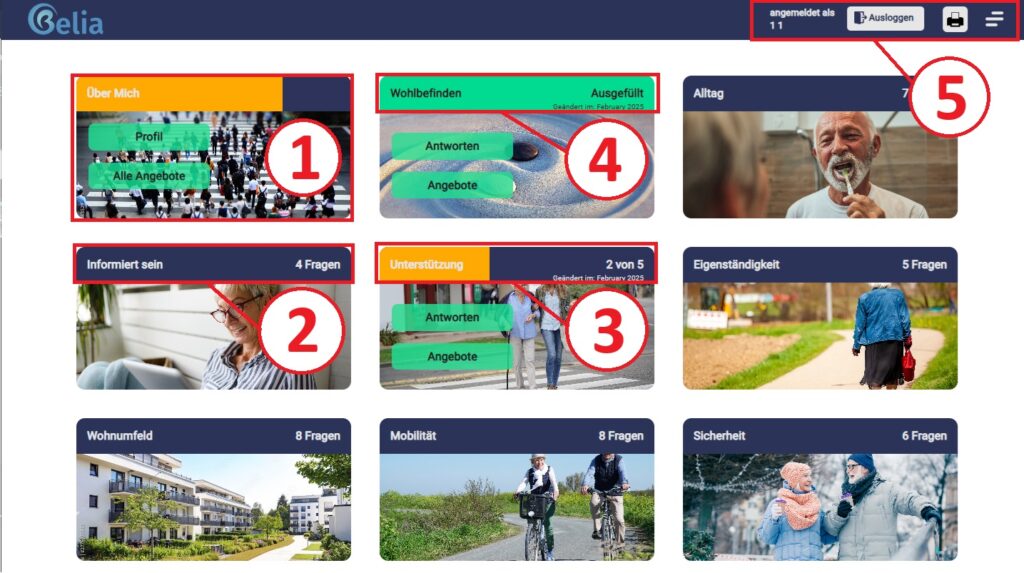
On the main overview page (dashboard) you have access to your personal profile as well as to all topic blocks (categories). You can complete these in the order that suits you. Furthermore, you can access your favourites here.
The “About me” topic block” Item 1 takes you to your personal profile.
The colour in the title of a topic block (category) reflects the status of answering the questions:
- BlueNot filled in
- YellowPartially completed
- GreenFully completed
In the bar above the dashboard (item 5) you will find the following information and functions:
Logged in as, Log out, Help, Font size, Menu
Below you will find a video which explains the dashboard in detail.
Belia Tool overview
Here you can find a video which explains the dashboard in detail below. You can find all videos at this link.